Introduction
This introduction aims to help App Composers navigate through the features of this powerful no-code editor, allowing effortless creation of custom applications tailored to their needs. At its core, the App Composer has been meticulously crafted to deliver unparalleled benefits and value, revolutionizing the way you conceptualize and build applications.

Benefits
Effortless Customization and Accelerated Development
The App Composer primarily facilitates everyone to design custom applications tailored to their unique requirements without the need for extensive coding expertise.
This helps in significant reduction in development time with the simplicity and efficiency of the no-code approach. In short, app composers can rapidly bring ideas to life and iterate on them effortlessly.
Comprehensive Data Insights and Streamlined App Management
The Home Dashboard provides a centralized view, offering real-time insights into the performance and metrics of the applications. It is easier to make informed decisions and track the progress of projects at a glance.
In addition, it aids in navigation through the Application Library effortlessly to manage, categorize, and explore a diverse range of applications. Robust filters and search functionalities also helps to save a lot of time while locating specific apps.
A Future-Ready Innovation with Enhanced Collaboration
Collaborate effectively with team members through shared design elements and components. This makes it effortless to stay ahead in the digital landscape with regular updates and feature enhancements.
Navigation Touchpoints
The navigation touch-points within the App Composer serve as a strategic roadmap, guiding users seamlessly through the application development process. Each touch-point plays a crucial role in enhancing user experience, fostering efficiency, and ensuring a cohesive journey from ideation to application refinement. The touch points referred above are:
Home Dashboard
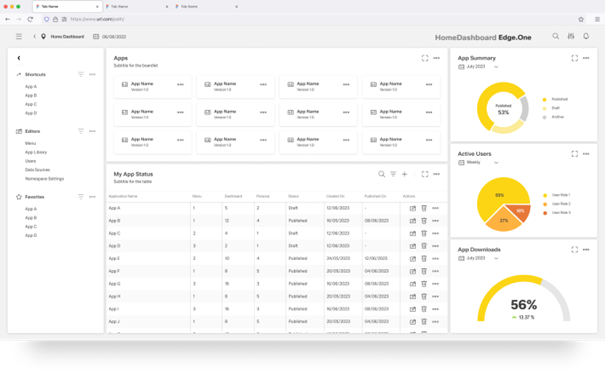
The Home Dashboard acts as the epicentre of the application development experience, providing an instant snapshot of essential metrics and insights. Users gain immediate visibility into the performance and status of existing applications, streamlining decision-making and project management.
Application Library
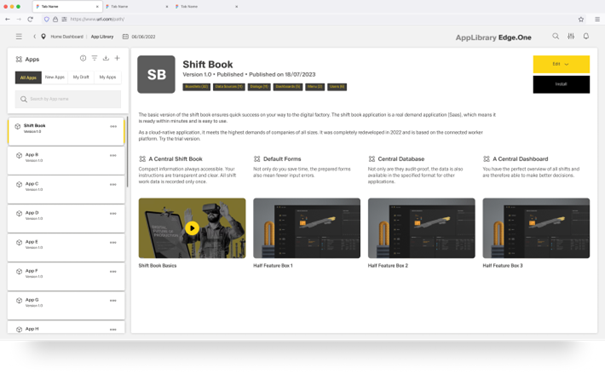
The Application Library serves as a repository of diverse applications categorized by status and domains. It works as a great starting point which facilitates effortless exploration and management of applications, allowing users to track progress and assess the purpose of each app. Additionally, filters and search capabilities certainly ensures efficient navigation.
Application Overview
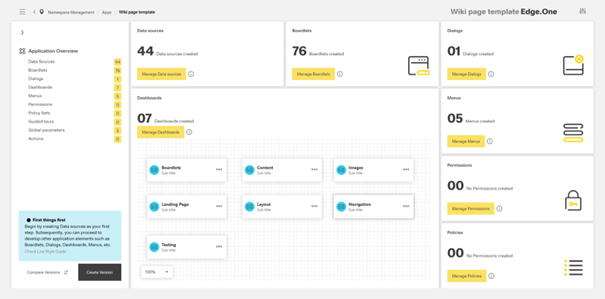
Upon selecting a specific application from the library, users are directed to the Application Overview, offering detailed insights into the chosen app. At this stage, it becomes much easier for the user to get a comprehensive insight of the application, including its components, functionalities, and status. The key components which are added to an application are Boardlets, Dialogs, Menus, Dashboards, Data Sources, User Permissions and Policies.
Boardlet Library
The Boardlet Library is a repository of boardlets, the building blocks for dashboards inside the app. A user would come to the component library to either update an existing variation of the boardlet, or create a new variation from scratch.
To help during creation, users can clone selected boardlets from boardlet libraries of other applications into their own. This doesn't just speed up the creation process, but also ensures design consistency between applications.

Boardlet Creator/Editor
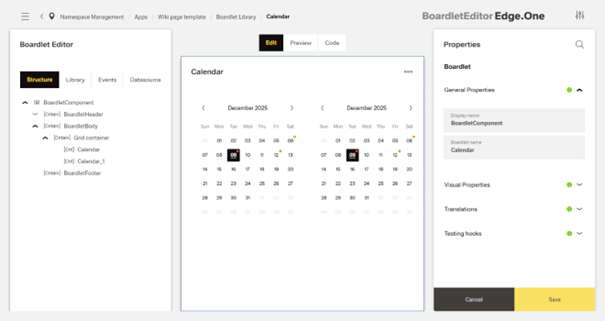
The Boardlet Editor empowers users to shape custom boardlets with unparalleled precision and ease. Offering both editing of existing elements and creation of new ones, it provides a rich suite of tools for fine-tuning visual attributes and defining functional behaviours. Seamlessly integrated with the broader ecosystem, it facilitates collaboration and efficiency, enabling users to effortlessly incorporate their creations into larger applications.
Data and the Data Hub
More information will soon be added.
Action Editor
More information will soon be added.